

Claude Code can do real keyword research once you connect it to an MCP server that holds search data. Claude knows a lot about SEO, but it has no live search volumes of its own, so any number it offers without a data source is a guess. This tutorial connects Cite42, a pay-per-call MCP server with no subscription, and walks through four steps: connect it, check keyword volume, check what AI answers recommend, and decide what to write. The same steps work in Codex.
Other servers bring SEO data into Claude Code too. Semrush and Ahrefs run official MCP servers for their subscribers, and DataForSEO, SE Ranking and Keywords Everywhere sell usage-based access. There's a short rundown near the end, and the SEO MCP server comparison covers them in detail.
Cite42 publishes this guide. Every keyword and AI answer result below is a real Cite42 response from October 5, 2026, saved in the evidence file. We checked the setup commands against Anthropic, OpenAI and Cite42 documentation, and researched the other servers from their official pages on October 6, 2026.
What you need
- Claude Code or Codex, installed and signed in.
- A Cite42 account. A verified signup adds $1.00 of free credit, and the full job in this guide costs $0.49 at current prices.
- One or two sentences about what you sell, who buys it and which country you're targeting.
Step 1: Connect Cite42 to Claude Code
Cite42's hosted MCP server uses browser sign-in, so there's no API key to paste. Run these two commands in a terminal:
claude mcp add --transport http --scope user cite42 https://mcp.cite42.dev
claude mcp login cite42
The first command registers the server for every project on your machine (--scope user). The second opens your browser so you can sign in to Cite42 and approve access. Start or restart Claude Code and type /mcp: cite42 should show as connected. If it says it needs authentication, finish the browser sign-in before you ask for any research.
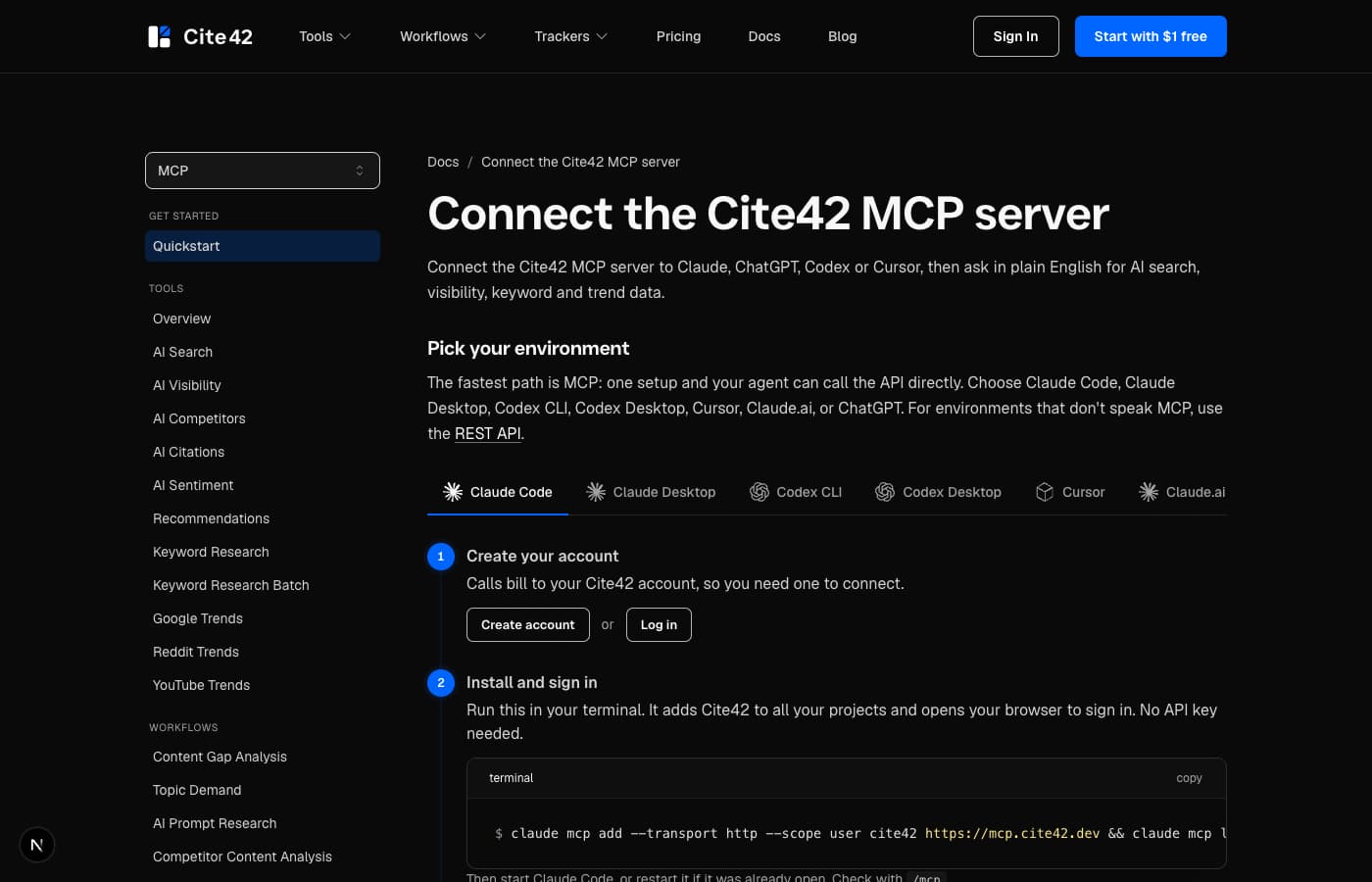
The Cite42 MCP quickstart has the same steps for Claude Desktop, Claude.ai, Cursor and ChatGPT. Anthropic's MCP guide explains remote servers, scopes and authentication in Claude Code.
Connect Codex instead
Codex connects to the same hosted server with its own two commands:
codex mcp add cite42 --url https://mcp.cite42.dev
codex mcp login cite42
OpenAI's Codex MCP guide covers the config file and other options. If you work in ChatGPT, the ChatGPT keyword research guide walks through developer mode setup.
Use an API key on a machine without a browser
On a remote server or in CI, browser sign-in is awkward. Create a key in the dashboard and run the published @cite42/mcp package instead:
claude mcp add --scope user cite42 -e CITE42_API_KEY=cite42_live_... -- npx -y @cite42/mcp
The tools are the same either way.
Step 2: Check keyword volume for your shortlist
Start by telling Claude what you sell and who it's for. Claude Code can brainstorm SEO topics all day, but without your audience, market and real capabilities it will suggest pages that attract readers you can't help. For Cite42 the question was which tutorials and comparisons would help a solo developer choose a tool for keyword research, Google Trends or AI visibility.
Here's the opening prompt we used:
We're planning content for Cite42, a pay-per-call API and MCP server
for keyword data, Google Trends and AI visibility.

Audience: solo developers who use Claude Code.
Market for keyword data: United States.
Suggest tutorials and comparisons our product can support.
List candidate keywords first, without volumes.
Show the tool calls and estimated cost before you run them.
Treat the keywords Claude suggests as ideas to test. A backlink audit tutorial might sound relevant, for example, but it needs data Cite42 doesn't sell, so it would bring in the wrong readers.
Each Cite42 keyword result gives the average monthly searches for one country, plus cost per click (CPC) and paid-search competition. A batch checks 2 to 50 keywords in one call for $0.09, or $0.03 if none of them has volume.
Ask Claude to check its shortlist in one batch:
Use cite42_keywords_batch for these seeds in country "us":
claude code seo, claude seo, seo mcp, google trends mcp,
ai visibility api.

Return requestedKeyword, status, volume, cpc and competitionLevel.
Keep null values and keep each requested term exactly as written.
Label which numbers came from Cite42 and which judgments are yours.
Our research batch covered 24 terms. These five rows are from it, retrieved for the US on October 5, 2026:
- Reported US monthly searches
- 90
- Reported US monthly searches
- 480
- Reported US monthly searches
- 90
- Reported US monthly searches
- 50
- Reported US monthly searches
- 10
Read volume as Google demand: it tells you how often people search a phrase, which is a different thing from future traffic to your page or the number of people asking an AI assistant. CPC and competition come from advertiser bidding, so they describe paid ads rather than how hard it is to rank organically. Cite42 has no organic keyword difficulty score, and Google's historical metrics documentation explains what the fields mean.
The response gives a monthly average without naming the months it covers, so save the retrieval date and country with the numbers.
The table changed our plan. "Claude seo" gets more than five times the searches of "claude code seo", so this page is written for both phrases. "Seo mcp" and "seo mcp server" ask the same question, so they share one comparison page instead of two thin ones. When you want new keyword ideas around a seed, use cite42_keywords with ideas turned on ($0.12 per seed).
Keep "no data" attached to the term you asked about
We also checked claude code keyword research with cite42. Cite42 returned status: "no_data" and volume: null for that exact phrase, and listed broader alternatives, including ai coding assistant at 18,100 monthly searches. Here's an abridged copy of the real response:
{
  "requestedKeyword": "claude code keyword research with cite42",
  "keyword": "claude code keyword research with cite42",
  "status": "no_data",
  "volume": null,
  "alternatives": [
    {
      "keyword": "ai coding assistant",
      "relationship": "broader_variant",
      "volume": 18100
    }
  ]
}
The 18,100 belongs to the broader phrase. Watch for this when an assistant shortens a long buyer question into a lookup term and then quotes the shorter term's volume as if it were the original. A phrase with no reported volume can still deserve a page when it describes a real buyer problem; just label that as your judgment. A single keyword with no volume costs $0.03.
Step 3: Check what AI answers recommend
Keyword volume tells you about Google. Buyers also ask ChatGPT, Claude or Perplexity directly, so check what those answers say about your topic too. Cite42's rankings tool sends your question to the AI tools you pick and reports which brands each answer named and in what order.
Use cite42_rankings for:
"Which tools can I use for SEO and keyword research in Claude Code?"

Track Cite42, Semrush, Ahrefs, DataForSEO and SE Ranking.
Use all five AI tools (fullSweep).
Report each brand's mention rate and first-mention position per AI tool,
and list any AI tool that failed separately.
When we ran this prompt on October 5, 2026, Semrush and Ahrefs were each named in four of the five answers and Cite42 in none. That result became the starting point of our AI visibility tracking case study, which follows the same prompts over time.
Check the sources too. For this prompt the answers drew on Anthropic's MCP documentation and broad "best SEO tools" roundups from Zapier, HubSpot, PCMag and Semrush, plus Moz's keyword research guide. For "What are the best SEO MCP servers for Claude and ChatGPT?", a citations check showed them citing comparison posts such as ContextBolt's, SE Ranking's and SEOptimer's lists, plus GitHub repositories. That tells you what kind of page gets read and which facts it needs to state plainly: install commands, prices and limits.
To script the same check, call the REST API with your key in an environment variable:
curl --fail-with-body https://www.cite42.dev/api/v1/rankings \
  -H "Authorization: Bearer $CITE42_API_KEY" \
  -H "Content-Type: application/json" \
  -d '{
    "query": "Which tools can I use for SEO and keyword research in Claude Code?",
    "competitors": ["Cite42", "Semrush", "Ahrefs", "DataForSEO", "SE Ranking"],
    "fullSweep": true
  }'
A check across all five AI tools (ChatGPT, Claude, Gemini, Perplexity and Google AI Overviews) costs $0.20. ChatGPT and Perplexity alone cost $0.08, and ChatGPT alone $0.05. Cite42 queries ChatGPT, Claude and Gemini through their official APIs with web search on, Perplexity through its own search, and Google AI Overviews from live Google results, so answers can differ from what a signed-in person sees in the app. The methodology page has the details.
Step 4: Decide what to write
Now ask Claude to turn the saved results into a brief. Keeping it tied to the evidence stops later edits from drifting away from what the numbers showed:
Using only the saved keyword and AI answer results, propose one article.

Include the reader's question, the audience, the primary keyword,
the workflow it will demonstrate, the evidence it needs and the CTA.
Explain why the topic fits Cite42 and label any guess about commercial value.
Check the existing blog for overlap before proposing a new URL.
Our decision was four pages: this Claude Code tutorial, the SEO MCP server comparison, a Google Trends MCP tutorial and an AI visibility API comparison. Each one answers a question close to what Cite42 actually does. Lower volumes were acceptable because each reader has a specific task in mind.
Google says established SEO practices still apply to AI Overviews and AI Mode, including accessible content and internal links, so the brief should cover those basics too. For a bigger plan built from the same data, see the content gap walkthrough.
What the whole job costs
At current prices, one keyword batch plus a rankings check and a citations check across all five AI tools costs $0.49. Add $0.05 for each Google Trends lookup if you want to see seasonality. The wider research behind this set of guides cost $3.46 on October 5, 2026: 20 paid requests, including 11 rankings checks, two citation checks, keyword and Trends calls, one AI search and one content-gap workflow.
Pick a stopping rule before you start. Ours was to research just enough to choose the first article, then reuse the saved results for the brief. A prompt like "keep researching until you're confident" leaves both the scope and the bill open. Cite42 also caches recent results, so an immediate repeat of the same check can return the cached answers rather than a fresh sample.
Cite42 pricing and where it fits
Cite42 is a pay-per-call API and MCP server for keyword research, Google Trends and AI visibility. There's no subscription and no monthly fee: you top up a prepaid balance (minimum $25.00), the balance never expires, and you pay only for successful calls. A verified signup adds $1.00 of free credit.
- Keywords: $0.09 for one keyword with volume, $0.12 with related ideas, $0.09 for a batch of up to 50.
- Google Trends: $0.05 per term.
- AI answers: rankings and citations from $0.01 per AI tool, $0.20 across all five.
- Trackers: save up to 30 prompts and rerun them weekly or monthly with stored history.
Cite42 has no organic keyword difficulty, backlink index or site crawler. If your decision depends on backlinks or a technical audit, pair it with a suite like Ahrefs or Semrush, or with a crawler you already use. The pricing page lists every tool.
Other SEO tools you can use in Claude Code
AI answers to "Which tools can I use for SEO and keyword research in Claude Code?" mostly name the big SEO suites. Here's what each one offers through MCP, checked on the vendors' pages on October 6, 2026:
- Semrush MCP: official hosted server with OAuth sign-in for keyword, backlink and domain data, plus traffic data with a Trends API plan. It needs an eligible Semrush plan, and requests use the same API units as the Semrush API.
- Ahrefs MCP: official hosted server for Keywords Explorer, Site Explorer, Site Audit and Brand Radar data, on Lite plans and above, metered in API units.
- DataForSEO MCP: open-source server that can call any DataForSEO API, billed at pay-as-you-go API rates with a $50 minimum payment.
- SE Ranking MCP: more than 160 tools covering keywords, backlinks, audits, projects and AI search, for accounts with API access.
- Keywords Everywhere MCP: Keyword Planner volumes, keyword ideas, traffic and backlinks at one credit per keyword, on annual plans.
- Keyword Tool MCP: Google and Bing keyword suggestions and volumes, on plans from $88 a month that share one daily request quota across the web app, API and MCP.
- claude-seo: if "Claude SEO" brought you here, you may be looking for this open-source Claude Code plugin. It runs technical, schema, E-E-A-T and AI search audits, and adds Keyword Planner volumes only when you supply your own Google Ads developer token.
The SEO MCP server comparison has prices, plan requirements and pros and cons for each.
Frequently asked questions
Can Claude Code do keyword research with real search volume?
Yes, once you connect an MCP server that has keyword data. Claude Code has no search volume of its own, so it needs a tool such as Cite42, Semrush, Ahrefs, DataForSEO or Keywords Everywhere. With Cite42 connected, Claude can check real monthly search volume for up to 50 keywords in one $0.09 batch.
What MCP servers give Claude Code real keyword search volume data?
Cite42, Semrush, Ahrefs, DataForSEO, SE Ranking, Keywords Everywhere and Keyword Tool all run MCP servers that return search volume. Cite42 and DataForSEO are pay as you go with no subscription. Semrush and Ahrefs need a paid plan, SE Ranking needs API access with credits, and Keywords Everywhere and Keyword Tool sell plans with included credits or daily request limits.
Where does Cite42's search volume data come from?
Each Cite42 keyword result is an average monthly search count for one country, plus CPC and paid-search competition. Cite42 doesn't provide an organic keyword difficulty score.
How much does SEO research in Claude Code cost with Cite42?
A batch of up to 50 keywords costs $0.09, and an AI answer check across five AI tools costs $0.20. The full job in this guide, one batch plus a rankings and a citations check, costs $0.49. Cite42 has no subscription: you prepay from $25.00, the balance never expires, and a verified signup includes $1.00 of free credit.
Does the same setup work in Codex?
Yes. Run codex mcp add cite42 --url https://mcp.cite42.dev and then codex mcp login cite42, and Codex gets the same keyword, Trends and AI visibility tools as Claude Code.
Run your first check
Pick five keywords you're unsure about and one question your buyers would ask an AI assistant. Create a Cite42 account for $1.00 of free credit, run the two setup commands above, and ask Claude for the batch and the rankings check. Once you can explain your next article from those results, you have a research routine worth repeating each month.